Building Agentic Systems and Advanced RAG Pipelines with LLMs
Large Language Models (LLMs) are great at generating fluent text, but on their own they do not know about your internal company documents, current configurations, or live systems. Building a useful AI assistant requires connecting the model to external knowledge and giving it the ability to search, verify facts, and use tools.
This blog post introduces the main concepts behind modern LLM applications. We will start with why basic Retrieval-Augmented Generation (RAG) often fails, and then look at how to improve search queries, compress context, and build more capable systems using Agentic RAG, Graph RAG, and LLM-Wikis.
Naive RAG and Why It Fails
Retrieval-Augmented Generation (RAG) is the standard way to let an LLM answer questions using your own documents. A basic RAG pipeline works in four steps:
- Prepare: Split documents into small text chunks and convert each chunk into a list of numbers (an embedding or vector) that captures its meaning.
- Retrieve: When a user asks a question, convert the question into a vector and find the top-\(k\) chunks with the most similar meaning.
- Augment: Paste those retrieved chunks into the prompt alongside the user’s question.
- Generate: Ask the LLM to answer the question using only the provided chunks.
While this works for simple questions, naive RAG often fails in practice for three reasons:
- Missing multi-step clues: A single search cannot follow new clues found inside a document. For example, if you ask why a background job failed, the retrieved support ticket might say the job failed with error code
QX-217, while the actual meaning ofQX-217(lease expired) is in a separate error catalog that was never retrieved. Simply fetching more chunks (increasing top-\(k\)) makes prompts slower and more expensive without guaranteeing that the missing definition is found. - Ignoring context: Similarity search only compares wording, not whether a document actually applies to your setup. A chunk that says “The default timeout is 30 seconds” (for Cloud) and one that says “The default timeout is 90 seconds” (for On-premise) look almost identical to a vector search, so the model may easily use the wrong one.
- Wording mismatch: Users often describe symptoms in everyday language (e.g. “my worker lost connection while moving money, what now?”), whereas technical manuals use formal procedural terms (e.g. “reconciliation protocol”). Because the words do not match, search may return generic sections instead of the exact recovery steps.
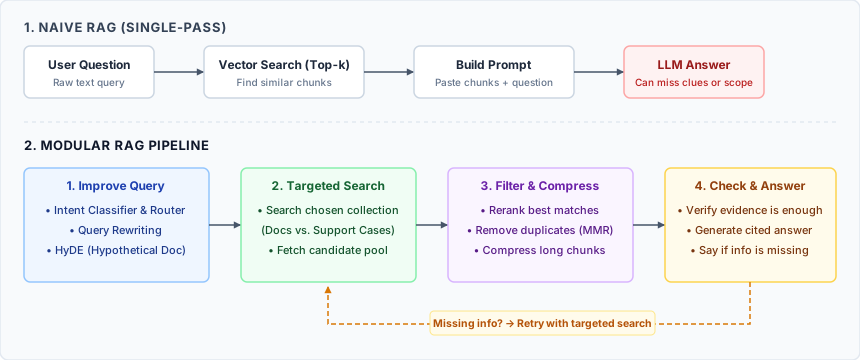
Naive RAG vs. Modular RAG Pipeline
Improving Queries: Rewriting, Intent Classification, Routing, and HyDE
When direct search misses relevant chunks, we can transform the search input while keeping the original user question for final answer generation:
- Query rewriting: Rephrases a conversational user story into a concise technical query while preserving conditions and before/after ordering.
- Intent classification and Routing: While rewriting changes how we search, routing changes where we search. An intent classifier identifies whether a request needs general product rules (documentation) or incident facts (support_cases). A router does not need to call an LLM. It can use explicit regex rules, embedding similarity, or a lightweight local classifier.
- HyDE (Hypothetical Document Embeddings): HyDE prompts an LLM to generate a short hypothetical manual paragraph, embeds that paragraph, and searches real chunks with its vector. The unverified hypothesis is never included in the answer prompt.
Even after a good search, not every retrieved chunk belongs in the final prompt. A common pattern is to retrieve a larger set of candidates (for example, 8 chunks) and then narrow them down to the best 3 or 4 chunks before asking the LLM to answer.
Agentic RAG
An improved RAG pipeline follows a fixed sequence of steps. Agentic RAG replaces this fixed pipeline with an AI agent that can decide its own search strategy step by step.
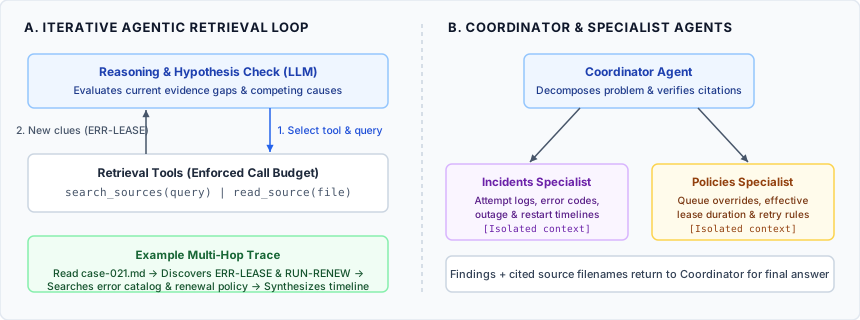
Iterative Agentic Retrieval and Coordinator–Specialist Architecture
This enables three key patterns:
- Following clues across documents: If the agent reads an incident report and sees an unfamiliar error code (
ERR-LEASE), it can decide on its own to run a second search forERR-LEASEin the error catalog. - Testing hypotheses: When troubleshooting an issue, the agent can check multiple possibilities against the evidence. For example, checking the logs to see whether a worker process restarted, and comparing timestamps to see if a network outage overlapped with a scheduled timeout.
- Coordinator agents: For complex questions, a Coordinator agent can split the problem and delegate parts of it to specialized sub-agents. Each specialist does its own search and returns a summary to the coordinator.
Graph RAG
Vector search is great for finding paragraphs of text, but it is poor at tracing chains of relationships across a system.
Imagine a Billing job queue that has a Primary route (using Cluster A) and a Backup route (using Cluster B). Looking at the text docs, having a backup route sounds safe. However, if both Cluster A and Cluster B rely on the same network gateway (Relay North), then a single failure in Relay North takes down both routes at once.
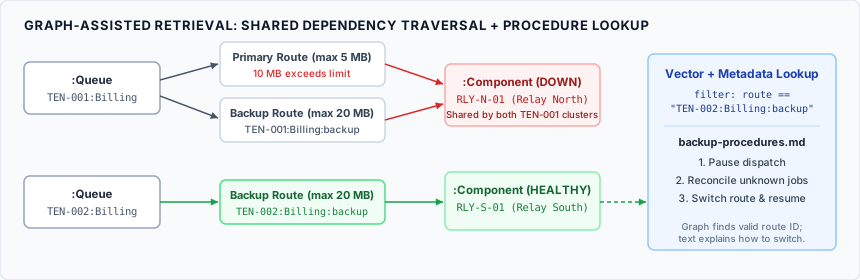
Graph-Assisted Retrieval: Tracing Shared Dependencies
Graph RAG solves this by storing items as nodes (Queues, Routes, Clusters, Components) and their connections as edges (uses, requires) in a graph database such as Neo4j. When a user asks “Which queues can still run if Relay North fails, and how do we switch them?”, the system:
- Queries the graph to trace the dependency chain and find a backup route that does not rely on
Relay North. - Searches the text documents for the step-by-step instructions on how to switch to that specific backup route.
LLM-Wikis
In most teams, knowledge is scattered: a deployment guide lists the commands to run, meeting notes explain why the team chose that approach, and an incident review explains what to watch out for. With standard RAG, the AI has to piece these fragments together from scratch every time someone asks a question.
An LLM-Wiki turns scattered files into a curated, living knowledge base with three layers:
- Original sources: The raw documents, meeting notes, and tickets kept as a permanent record.
- Topic index: A clear folder or topic tree designed by humans so the agent can browse topics and open only what it needs.
- Wiki pages: Markdown pages maintained by an LLM that combine the how, the why, and past lessons learned into a single readable page with links back to the original sources.
When a new document arrives (such as a new meeting note), a curation agent finds the related wiki pages and updates them. If the new note contradicts an existing rule. For example, if the deployment guide says “The team lead approves deployments” but a new note says “Teams deploy independently” - the agent flags the conflict for a human to review rather than guessing which one is right.
Conclusion
There is no single architecture that fits every AI application; the best choice depends on how your data is organized and how complex the user’s questions are. Starting with a simple pipeline and adding capabilities only where needed keeps systems easier to debug and cheaper to run.
The table below summarizes how the different techniques compare:
| Technique | Best Used For | How It Works | Speed & Cost | Main Limitation |
|---|---|---|---|---|
| Naive RAG | Simple Q&A over small, clean documents. | Finds the top-\(k\) most similar text chunks in one step. | Fastest & cheapest | Fails when answers require multiple steps or strict version checks. |
| Modular RAG | Reliable Q&A over product manuals and support docs. | Adds query rewriting, routing, HyDE, reranking, and context compression. | Fast to Medium | Follows a fixed path; cannot investigate open-ended mysteries. |
| Agentic RAG | Troubleshooting and multi-step investigations. | The LLM searches, reads clues, tests hypotheses, and delegates to specialists in a loop. | Slower & higher token cost | Can take many steps; needs a strict limit on tool calls. |
| Graph RAG | Tracing system dependencies and broad corpus themes. | Combines a graph database (nodes and relationships) with text search. | Medium query cost; higher setup cost | Requires building and maintaining a graph of your entities. |
| LLM-Wiki | Turning scattered notes and tickets into clean docs. | An agent maintains linked Markdown wiki pages and flags conflicts for humans. | Fast at query time | Requires human review when source documents contradict each other. |